



Quick Answer
RDA Run-Down Adapters simulate the resistance of a threaded fastening application during torque testing. When used with compatible Mountz torque analyzers and sensors, they help improve torque verification accuracy by creating a more realistic testing condition than testing directly against a hard stationary surface.
Who This Is For
- Quality engineers
- Manufacturing engineers
- Process engineers
- Calibration technicians
- Metrology laboratories
- Production teams
- Companies implementing torque verification programs
- Facilities performing in-house tool testing and calibration
When Should You Use This?
Use an RDA Run-Down Adapter when:
- Testing torque-controlled tools
- Verifying tool performance
- Performing calibration activities
- Simulating an actual fastening application
- Conducting quality control inspections
- Establishing a repeatable torque testing process
When Should You NOT Use This?
An RDA Run-Down Adapter may not be necessary when:
- The application does not require torque verification
- Tool testing is not being performed
- A simulated joint condition is not required
- The adapter is not compatible with the torque range being tested
How RDA Run-Down Adapters Work
An RDA Run-Down Adapter is installed between the torque tool and the torque sensor during testing.
The adapter creates resistance that simulates the characteristics of a threaded joint, allowing the tool to run down before reaching final torque.
This helps create a more representative testing condition compared to applying torque directly into a static sensor.
Result:
- More realistic torque testing
- Improved test repeatability
- Better simulation of fastening applications
- Consistent torque verification results
Core Features
- Simulates a threaded fastening application
- Provides repeatable testing conditions
- Compatible with Mountz torque analyzers and sensors
- Supports torque verification programs
- Suitable for calibration and testing applications
- Available in multiple configurations
- Designed for hand tool and power tool testing
Configuration Options
Multiple Adapter Styles
Mountz offers several run-down adapter styles to support different testing requirements and torque ranges.
Sensor Compatibility
RDA adapters are designed for use with compatible Mountz torque sensors and analyzers.
Application Flexibility
RDA adapters can be used for:
- Power tool testing
- Hand tool verification
- Calibration activities
- Quality control inspections
- Production testing programs
Understanding Run-Down Adapters
What Is a Run-Down Adapter?
A run-down adapter is a testing accessory that simulates the resistance of a threaded fastening application.
Instead of immediately reaching peak torque, the tool runs down against the adapter before torque is applied to the sensor.
Why Use a Run-Down Adapter?
Many fastening tools perform differently in an actual joint than they do when tested directly against a rigid surface.
A run-down adapter helps create a more representative testing environment for torque verification activities.
What Makes the RDA Different?
The RDA combines the following features to support torque testing and calibration applications:
- Simulated joint resistance
- Repeatable testing conditions
- Compatibility with Mountz torque analyzers
- Compatibility with Mountz torque sensors
- Support for calibration and verification programs
Understanding Joint Simulation
Why Is Joint Simulation Important?
When testing fastening tools, it is often desirable to replicate actual assembly conditions as closely as possible.
A run-down adapter helps simulate the resistance encountered during a fastening cycle, allowing the tool to operate more similarly to how it would in production.
Hard Joint vs. Simulated Joint Testing
Testing directly into a sensor can create a hard-joint condition.
Using a run-down adapter introduces additional rundown before final torque is reached, helping create a more realistic testing environment for many fastening applications.
Available Models
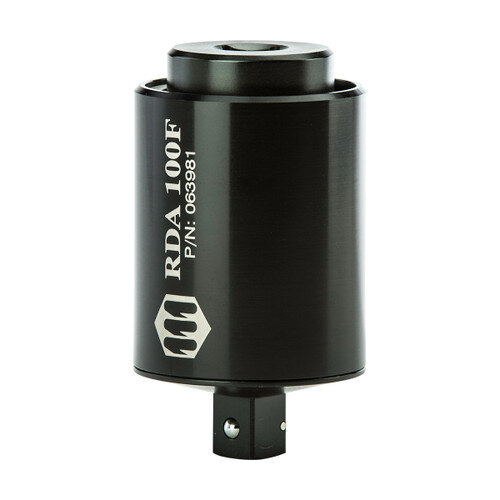
The RDA Series consists of run-down adapters designed to provide consistent and reliable torque readings when testing power-driven torque control tools. Installed inline between the torque tool and a compatible torque sensor, RDA adapters simulate joint resistance, helping create more representative torque testing conditions than testing directly against a rigid sensor. Models are available in a wide range of torque capacities to support both low- and high-torque applications.
How RDA Models Are Specified
Each RDA model is identified by its maximum torque capacity. The suffix "i" denotes inch-pound (lbf.in) models; the suffix "F" denotes foot-pound (lbf.ft) models.
When selecting a model, choose the adapter whose operating torque range matches the torque output of the tool being tested.
All standard RDA adapters:
- Operate in the clockwise direction only
- Feature a non-rotating body for improved safety
- Use hardened thread components for increased life and accuracy
- Mount inline between the tool and torque sensor
- Should be completely backed out after each run-down before the next test
Model Selection Guide
Need low-torque power tool testing?
Choose:
- RDA-10i
- RDA-25i
- RDA-50i
These models are ideal for lower torque electric screwdrivers and precision fastening applications.
Need medium torque production testing?
Choose:
- RDA-100i
- RDA-250i
- RDA-750i
Designed for higher-capacity screwdrivers and medium-torque fastening tools.
Need high-torque wrench testing?
Choose:
- RDA-50F
- RDA-100F
- RDA-250F
- RDA-500F
- RDA-1000F
- RDA-2500F
- RDA-5000F
These models support high-capacity power tools and torque wrenches used in industrial assembly and calibration applications.
Need compatibility with Mountz torque analyzers?
Choose any RDA model.
All standard RDA adapters are designed for use with compatible Mountz torque analyzers and torque sensors for testing power-driven torque control tools.
RDA Models
| Model | Item Number | Torque Range | Metric Range | Square Drive |
|---|---|---|---|---|
| RDA-10i | 063970 | 1–10 lbf.in | 11.3–113 cN·m | 1/4" |
| RDA-25i | 063971 | 2–25 lbf.in | 28–282.5 cN·m | 1/4" |
| RDA-50i | 063972 | 5–50 lbf.in | 56.5–565 cN·m | 1/4" |
| RDA-100i | 063973 | 10–100 lbf.in | 113–1130 cN·m | 1/4" |
| RDA-250i | 063974 | 25–250 lbf.in | 282.5–2825 cN·m | 1/4" |
| RDA-750i | 063977 | 75–750 lbf.in | 847–8473 cN·m | 3/8" |
| RDA-50F | 063978 | 5–50 lbf.ft | 6.8–67.8 N·m | 3/8" |
| RDA-100F | 063981 | 10–100 lbf.ft | 13.6–135.6 N·m | 1/2" |
| RDA-250F | 063982 | 25–250 lbf.ft | 33.9–339 N·m | 1/2" |
| RDA-500F | 063983 | 50–500 lbf.ft | 67.8–678 N·m | 3/4" |
| RDA-1000F | 063991 | 100–1000 lbf.ft | 135.6–1355 N·m | 1" |
| RDA-2500F | 063990 | 250–2500 lbf.ft | 339–3389 N·m | 1½" |
| RDA-5000F | 063992 | 500–5000 lbf.ft | 678–6779 N·m | 1½" |
Which RDA Model Should I Select?
Start with these questions:
- What torque range will be tested?
- Is the application using inch-pound or foot-pound tools?
- What square drive size is required?
- Will the adapter be used with hand tools or power-driven torque control tools?
- Is the adapter compatible with the connected torque sensor?
- Does the application require low-, medium-, or high-torque testing?
The answers to these questions will help determine the appropriate RDA model for the application.
If you are still unsure which model to select, contact Mountz Applications Engineering for a recommendation based on your specific tool and application.
Setup & Adjustment
To use an RDA Run-Down Adapter:
- Select the RDA model that matches the tool's operating torque range, then connect it inline between a compatible Mountz torque sensor and the torque tool.
- Verify all mechanical connections before testing.
- Select the RDA model that matches the tool's operating torque range.
- Operate the tool in the clockwise direction only.
- After each run-down, completely back the adapter out before performing the next test.
- Review torque results using the connected torque analyzer.
Following these steps helps provide consistent, repeatable torque testing and more representative joint simulation for calibration and verification activities.
Applications
RDA Run-Down Adapters are commonly used in:
- Manufacturing environments
- Calibration laboratories
- Quality control departments
- Production testing stations
- Tool verification programs
Calibration & Quality Programs
RDA adapters support:
- Torque verification
- Calibration activities
- Tool performance testing
- Quality control initiatives
- Measurement validation programs
Using a run-down adapter can help improve consistency and repeatability during testing activities.
Integration & Advanced Features
- Compatible with Mountz torque analyzers
- Compatible with Mountz torque sensors
- Supports simulated joint testing
- Suitable for calibration and verification activities
- Designed for quality control and testing environments
- Available in multiple configurations
Media & Supporting Content
Related Articles / Content
- Mountz Torque Measurement Catalog
- Mountz Torque Analyzers & Sensors Bang Sheet
- Mountz Torque Analyzers & Sensors Service Card
- Webinar: How to Improve Quality with a Torque Verification Process
- Webinar: How to Improve Torque Control with In-Process Monitoring
Need Help?
- Contact Applications Engineering for setup guidance
- Speak with Sales for product selection
- Call us:
- North America:(408) 850-9978
- International: +44 1428 741756


 M-F 6am - 5pm PST


