



Quick Answer
The EZ-TorQ III Torque Analyzer is used to verify tool performance, validate calibration status, and measure torque values for hand tools and non-impacting power tools. It provides a portable solution for calibration labs, assembly stations, and production environments.
Who This Is For
- Quality engineers and quality assurance teams
- Calibration technicians and metrology labs
- Manufacturing and process engineers
- Production supervisors and assembly teams
- Companies implementing torque verification programs
- Facilities performing in-house tool calibration and validation
- Aerospace, automotive, electronics, medical device, and industrial manufacturers
When Should You Use This?
Use the EZ-TorQ III when:
- Torque tools require routine verification or calibration
- Daily, weekly, or monthly tool validation is performed
- Quality standards require documented torque verification
- Tool performance needs to be checked directly on the assembly line
- Torque data collection is important
- You want to reduce calibration turnaround times
- In-house torque testing is part of your quality program
When Should You NOT Use This?
Do not use the EZ-TorQ III when:
- External torque sensors are required
- A broader torque range is needed than a single analyzer model provides
- Impact tools need to be tested
- Pulse tools need to be tested
If external sensors or greater measurement flexibility are required, Mountz recommends considering the LTT-Series Torque Analyzer.
How the EZ-TorQ III Works
The EZ-TorQ III uses an integrated transducer to measure torque applied by hand tools and non-impacting power tools.
The analyzer:
- Measures torque values
- Verifies tool performance
- Determines whether a tool remains within calibration limits
- Captures and stores torque readings
- Creates statistical data and historical records
- Supports calibration and quality verification programs
Result:
- Improved quality control
- Faster tool verification
- Reduced downtime
- Better traceability
- Increased confidence in torque tool performance
Core Features
- Integrated transducer
- Portable, rechargeable design
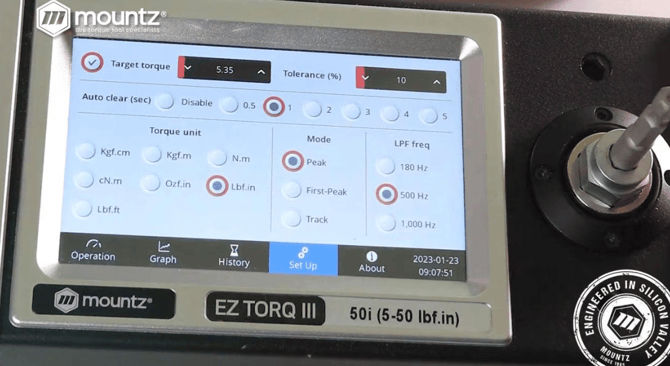
- 5" full-color touchscreen interface
- Li-ion rechargeable battery
- Data capture and storage capabilities
- Swappable SD card memory
- Statistical Process Control (SPC) analysis
- Multi-language operation
- Historical data recording
- Mountz EZ-TorQ III Data Streamer software
- Torque calibration and verification capabilities
Configuration Options
Integrated Transducer Design
Each EZ-TorQ III model includes a built-in transducer matched to its measurement range. External torque sensors cannot be connected.
Data Collection & Analysis
The analyzer captures, stores, analyzes, and exports torque data using onboard software and EZ-TorQ III Data Streamer software.
Portable Operation
The rechargeable battery-powered design allows the analyzer to be carried directly to assembly stations for verification and validation activities.
Available Models
The EZ-TorQ III is available in eight models with integrated transducers covering torque ranges from 0.1–300 lbf.in (1.1–3390 cN·m). Each model is optimized for a specific torque range and includes a built-in transducer, making it ideal for portable torque verification of hand tools and non-impacting power tools.
EZ-TorQ III Model Specifications
| Model | Item Number | Torque Range (lbf.in) | Torque Range (cN·m) | Drive Size |
|---|---|---|---|---|
| EZ-TorQ III 1i | 070620 | 0.1–1 | 1.1–11.3 | 1/4" Female Square |
| EZ-TorQ III 3i | 070621 | 0.3–3 | 3.4–33.9 | 1/4" Female Square |
| EZ-TorQ III 5i | 070622 | 0.5–5 | 5.6–56.5 | 1/4" Female Square |
| EZ-TorQ III 10i | 070810 | 1–10 | 11.3–113 | 17 mm Female Hex |
| EZ-TorQ III 50i | 070811 | 5–50 | 56.5–565 | 17 mm Female Hex |
| EZ-TorQ III 100i | 070812 | 10–100 | 113–1130 | 17 mm Female Hex |
| EZ-TorQ III 150i | 070813 | 15–150 | 169.5–1695 | 17 mm Female Hex |
| EZ-TorQ III 300i | 070814 | 30–300 | 339–3390 | 17 mm Female Hex |
Model Selection Guide
Choose the model that best matches the normal operating torque of the tools you verify.
| If your application requires... | Recommended Model |
|---|---|
| Precision micro torque tools | EZ-TorQ III 1i |
| Small electronic assembly screwdrivers | EZ-TorQ III 3i |
| Low-torque production screwdrivers | EZ-TorQ III 5i |
| General-purpose precision assembly tools | EZ-TorQ III 10i |
| Medium-torque electric or pneumatic screwdrivers | EZ-TorQ III 50i |
| Higher-capacity assembly tools and torque wrenches | EZ-TorQ III 100i |
| Large torque wrenches and production tools | EZ-TorQ III 150i |
| High-capacity torque verification applications | EZ-TorQ III 300i |
Included Run-Down Adapters
Each EZ-TorQ III model includes Screw RDA run-down adapters matched to its torque range. The 3i and 5i models also include an S-Series Run-Down Adapter for soft-joint testing. Additional S-Series Run-Down Adapters are available separately for the 10i–300i models.
| EZ-TorQ III Model | Included Adapter(s) |
|---|---|
| 1i | Screw RDA M2Q |
| 3i | Screw RDA M2Q + S-Series RDA-S0 |
| 5i | Screw RDA M3Q + S-Series RDA-S1.5 |
| 10i | Screw RDA M2 + M3 |
| 50i | Screw RDA M3 + M4 |
| 100i | Screw RDA M4 + M6 |
| 150i | Screw RDA M4 + M8 |
| 300i | Screw RDA M8 + M12 |
Additional S-Series Run-Down Adapters are available separately for the 10i–300i models when soft-joint testing is required.
Choosing the Right EZ-TorQ III
When selecting an EZ-TorQ III analyzer, consider:
- The normal operating torque of the tools being tested
- The required measurement resolution
- Whether you'll primarily test hand tools or non-impacting power tools
- The type of run-down adapter needed for hard- or soft-joint testing
- Whether portability and on-the-floor verification are priorities
Selecting an analyzer with a measurement range that closely matches your application provides the best accuracy and resolution for torque verification.
Setup & Adjustment
Before using the EZ-TorQ III:
- Charge the analyzer using the supplied power adapter.
- Install the appropriate run-down adapter for the tool and application being tested.
- Select the desired operating mode and measurement units.
- Connect the torque tool to the analyzer.
- Perform the torque verification or calibration test.
- Save, review, or export measurement results as needed.
Run-Down Adapter Selection
The EZ-TorQ III includes Screw RDA run-down adapters matched to the selected analyzer model. The 3i and 5i models also include an S-Series Run-Down Adapter for soft-joint testing. Additional S-Series Run-Down Adapters are available separately for the 10i–300i models.
Data Collection
The analyzer can store measurement data internally and export results using the EZ-TorQ III Data Streamer software and the removable SD card, allowing users to document torque verification, calibration, and quality control activities.
Use Cases (Real-World Examples)
1. Assembly Line Verification
Problem: Production tools require routine validation between calibration intervals.
Solution: The EZ-TorQ III provides quick verification directly on the assembly floor.
2. Quality Control Programs
Problem: Torque readings need to be documented and reviewed.
Solution: The analyzer captures and stores torque data for future reference.
3. Calibration Laboratories
Problem: Tool calibration turnaround times are too long.
Solution: In-house testing and verification help reduce downtime.
4. Manufacturing Process Validation
Problem: Engineers need confirmation that torque tools are operating within acceptable limits.
Solution: The analyzer verifies tool performance and calibration status.
Troubleshooting
Issue 1: Analyzer will not power on
Cause: Battery may be discharged.
Solution: Recharge the analyzer using the supplied charger.
Issue 2: Inconsistent readings
Cause: Improper setup or worn rundown adapters.
Solution: Verify setup and inspect accessories.
Issue 3: Tool cannot be tested properly
Cause: Analyzer capacity may not match the tool being tested.
Solution: Verify the selected analyzer model is appropriate for the torque range.
Issue 4: Data is not being recorded
Cause: Storage or software settings may need to be reviewed.
Solution: Verify storage configuration and software settings.
Calibration & Standards
- ISO 17025 calibration certificate included
- Accuracy:
- ±0.5% of reading from 20% to 100% of capacity
- ±1% of reading from 10% to 20% of capacity
- Designed for calibration and verification applications
Integration / Advanced Notes
- Built-in transducer design
- EZ-TorQ III Data Streamer software
- Statistical Process Control (SPC) analysis
- Historical data storage
- Swappable SD card memory
- Multi-language operation
- Not compatible with external torque sensors
- Not intended for impact or pulse tools
Media & Supporting Content
-1.png?width=670&height=482&name=White%20Paper%20Images%20(5)-1.png)
Related Articles / Content
- Mountz Torque Measurement Digital Catalog
- Mountz Torque Analyzers & Sensors Bang Sheet
- Maintaining Precision in Torque Tools: A Comprehensive Guide
- Mastering Torque: A Comprehensive 10-Step Guide to Achieving Precision Control
- Whitepaper: Understanding Calibration Certificates in Torque Measurement
- Webinar: How to Identify When a Torque Tool is Drifting Out of Calibration
- Webinar: How to Calibrate a Torque Wrench and Screwdriver
Need Help?
- Contact Applications Engineering for setup guidance
- Speak with Sales for product selection
- Call us:
- North America:(408) 850-9978
- International: +44 1428 741756


 M-F 6am - 5pm PST


