



EZ-Glider Position Control Torque Arms – FAQ & User Guide
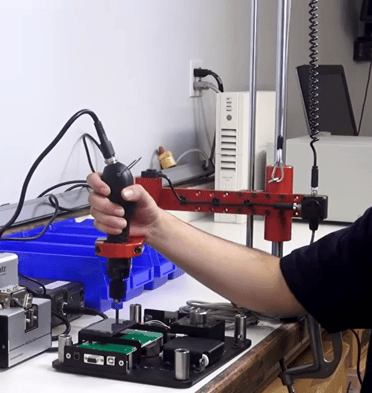
EZ-Glider position control torque arms are advanced tool support systems designed to support assembly tools, absorb torque reaction from power tools, and provide position-based control during fastening. These systems use encoders and programmable sequences to ensure correct fastening order, improve alignment, and reduce assembly errors in production environments.
Quick Answer
EZ-Glider torque arms combine torque reaction control with encoder-based position tracking to guide fastening sequences, reduce errors, and improve assembly quality.
Who This Is For
- Manufacturing & process engineers
- Assembly operators
- Quality and process control teams
- Automation and industrial engineers
- Automotive, aerospace, electronics, and high-reliability manufacturing
- CX and Sales teams supporting advanced assembly systems
When Should You Use This?
Use EZ-Glider position control torque arms when:
- Fastening sequence must be controlled and verified
- Assembly errors (missed screws, wrong order) need to be reduced
- Torque reaction from power tools needs to be managed
- Maintaining proper tool alignment is critical
- Applications require process control and error-proofing
When Should You NOT Use This?
Do not use EZ-Glider if:
- Basic tool support is sufficient → use CTA, ATS, or LTS
- No sequence control or validation is required
- Workspace does not allow system integration
- A simple mechanical torque arm meets application needs
How EZ-Glider Torque Arms Work
EZ-Glider systems combine torque arm support with position control technology:
- Tool is mounted to the torque arm
- Arm absorbs torque reaction generated during fastening
- Encoders track tool position in real time
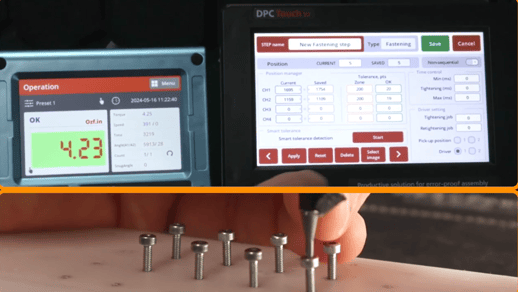
- System verifies correct fastening location and sequence
- Programmable logic ensures proper fastening order
- Operator is guided through the fastening process
Result:
Improved process control, reduced assembly errors, and consistent fastening quality
Core Features
- Encoder-based position tracking for real-time tool location
- Programmable fastening sequence control
- Absorbs torque reaction from power tools
- Supports tool alignment to reduce side load
- Helps prevent missed fasteners and incorrect sequences
- Improves quality control in assembly processes
- Designed for production and error-proofing applications
Configuration Options
- Programmable sequence configurations
- Integration with control systems (based on application setup)
- Workstation mounting configurations (bench, rail, or wall dependent)
- Tool mounting compatibility (holder/clamp dependent)
Available Models (Position Control Torque Arms)
- EZ-12RPC – Part #260165
- EZ-25RPC – Part #260156
- EZ-40RPC – Part #260157
- EZ-100RPC – Part #260158
Setup & Adjustment
- Mount torque arm to workstation or integration system
- Attach tool using appropriate holder or clamp
- Configure encoder and position tracking system
- Program fastening sequence and locations
- Verify system response and positioning accuracy
Can It Be Adjusted Later?
Yes:
- Fastening sequence can be reprogrammed
- Position tracking zones can be adjusted
- Tool mounting and system setup can be modified
Decision Guide
EZ-Glider vs Other Torque Arm Options
Use EZ-Glider when:
- Fastening sequence control is required
- Error-proofing (poka-yoke) is needed
- Process control and traceability are priorities
- High-reliability assembly is required
Consider other options when:
- Only ergonomic support is needed → CTA / ATS / LTS
- No sequence validation is required
- Simpler mechanical solution is sufficient
Use Cases (Real-World Examples)
- Automotive Assembly
Problem: Incorrect fastening sequence leads to quality issues
Solution: EZ-Glider enforces programmed sequence and verifies completion - Electronics Manufacturing
Problem: Missed fasteners and inconsistent assembly
Solution: Position tracking ensures all fastening points are completed - High-Reliability Production
Problem: Assembly errors create rework and defects
Solution: Error-proofing system improves process control and consistency
Troubleshooting
Issue 1: System not recognizing tool position
Cause: Encoder or positioning system not calibrated
Solution: Verify encoder setup and system configuration
Issue 2: Incorrect sequence prompts
Cause: Program configuration error
Solution: Review and update sequence logic
Issue 3: Fastening errors still occurring
Cause: Improper setup or alignment
Solution: Verify positioning zones and tool alignment
Calibration & Standards
- No torque calibration required for the arm itself
- Position control system should be verified per application requirements
- Follow internal quality and process control standards
Integration / Advanced Notes
- Mechanical system combined with electronic position tracking
- Uses encoders for real-time positioning
- Supports programmable logic for sequence control
- Designed for error-proofing and process-controlled assembly
Media & Supporting Content
- Product Datasheet
- Video: Ensure Screws are Correctly Tightened in the Correct Sequence with Position Control Torque Arm
Related Articles / Content
- EZ-Glider Position Control Torque Arm Product Page
- Torque Arm Product Catalog (ATS, CTA, LTS Overview)
- Webinar: How to Select an Ergonomic Torque Arm Solution to Reduce Workers’ Comp Liability
- Webinar: How to Ensure Screws Are Tightened in the Correct Sequence
- How to Choose a Torque Arm Solution
- Ergonomic Torque Arm: Prevent Side Load & Cross-Threading
- Mountz REBA-Informed Ergonomic Risk Scale for Fastening Applications
Need Help?
- Contact Applications Engineering for setup guidance
- Speak with Sales for system configuration and selection
- Call us:
- North America:(408) 850-9978
- International: +44 1428 741756


 M-F 6am - 5pm PST


