



Quick Answer
CTA-Series torque arms support assembly tools and absorb torque reaction, using a telescoping carbon design to provide adjustable reach and improved ergonomics.
Who This Is For
- Manufacturing engineers
- Process engineers
- Quality engineers
- Assembly operators
- Ergonomics and safety teams
- Automotive, aerospace, electronics, and general manufacturing facilities
When Should You Use This?
Use CTA-Series torque arms when:
- Torque reaction from power tools needs to be managed
- Operator ergonomics is a concern
- Adjustable reach or extended working range is required
- Applications involve repetitive fastening
- Maintaining proper tool alignment is important
When Should You NOT Use This?
Do not use CTA-Series if:
- Tool support is not required
- Workspace does not allow mounting
- A fixed, non-adjustable setup is required
- Vertical tool balancing is the primary need
How CTA-Series Torque Arms Work
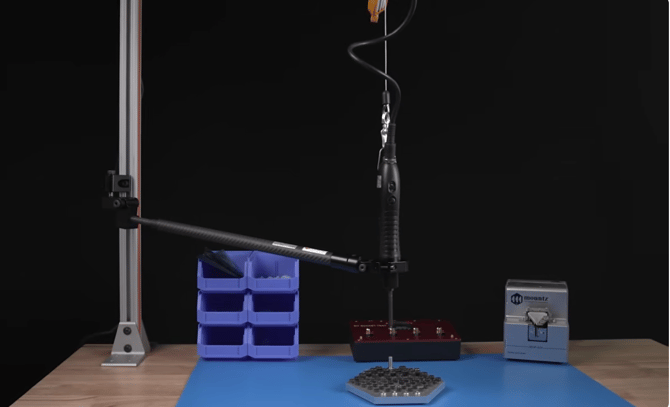
CTA-Series torque arms support assembly tools through a telescoping arm structure:
- Tool is mounted to the arm
- Arm absorbs torque reaction generated during fastening
- Telescoping section adjusts to extend or retract reach
- Arm helps maintain perpendicular alignment to the fastener
- Operator guides the tool with supported movement rather than lifting it
Result: Improved ergonomics, reduced operator strain, and more consistent tool positioning
Core Features
- Telescoping arm design for adjustable reach
- Lightweight carbon construction for reduced handling effort
- Absorbs torque reaction from power tools
- Supports tool alignment to reduce side load
- Helps prevent cross-threading during fastening
- Designed for production environments
Common Applications
CTA-Series torque arms are commonly used in:
- Electronics assembly
- Automotive manufacturing
- Aerospace assembly
- Medical device manufacturing
- General industrial assembly
- High-volume production workstations
Configuration Options
- Adjustable telescoping arm for varying workstation reach
- Bench, wall, and rail mounting options
- Compatible with a variety of tool holders and clamps
Available Models (CTA-Series Telescoping Torque Arms)
The CTA-Series is available in multiple torque capacities and arm lengths to support a wide range of assembly applications. Models are designed to absorb torque reaction while providing adjustable reach and improved ergonomics for electric and pneumatic assembly tools.
CTA-Series Model Chart
| Model | Item Number | Max Torque | Reach (Collapsed–Extended) | Clamp Diameter |
|---|---|---|---|---|
| CTA-15-1000 | 260608 | 11 lbf.ft (15 N·m) | 19.1"–39.4" | 1"–1¾" |
| CTA-15-1500 | 260609 | 11 lbf.ft (15 N·m) | 25.4"–59" | 1"–1¾" |
| CTA-15-2000 | 260610 | 11 lbf.ft (15 N·m) | 31.7"–78.7" | 1"–1¾" |
| CTA-40-1000 | 260611 | 29.5 lbf.ft (40 N·m) | 19.3"–39.4" | 1¼"–2¼" |
| CTA-40-1500 | 260612 | 29.5 lbf.ft (40 N·m) | 25.6"–59" | 1¼"–2¼" |
| CTA-40-2000 | 260613 | 29.5 lbf.ft (40 N·m) | 32.3"–78.7" | 1¼"–2¼" |
| CTA-40-2500 | 260614 | 29.5 lbf.ft (40 N·m) | 38.8"–98.4" | 1¼"–2¼" |
| CTA-80-1500 | 260615 | 59 lbf.ft (80 N·m) | 26"–59" | 1¼"–2¼" |
| CTA-80-2000 | 260616 | 59 lbf.ft (80 N·m) | 32.6"–78.7" | 1¼"–2¼" |
| CTA-80-2500 | 260617 | 59 lbf.ft (80 N·m) | 39.3"–98.4" | 1¼"–2¼" |
| CTA-150-1500 | 260618 | 110 lbf.ft (150 N·m) | 26.3"–59" | 1½"–2¾" |
| CTA-150-2000 | 260619 | 110 lbf.ft (150 N·m) | 33"–78.7" | 1½"–2¾" |
| CTA-150-2500 | 260620 | 110 lbf.ft (150 N·m) | 43"–98.4" | 1½"–2¾" |
| CTA-220-1500 | 260621 | 162 lbf.ft (220 N·m) | 26.3"–59" | 1½"–2¾" |
| CTA-220-2000 | 260622 | 162 lbf.ft (220 N·m) | 33"–78.7" | 1½"–2¾" |
| CTA-220-2500 | 260623 | 162 lbf.ft (220 N·m) | 39"–98.4" | 1½"–2¾" |
Specifications are based on the CTA-Series Product Data Sheet. Verify with the current product datasheet before ordering.
Model Selection Guide
| If you need... | Recommended Model |
|---|---|
| Small workstations with low reaction torque | CTA-15 Series |
| Light- to medium-duty assembly applications | CTA-40 Series |
| Higher torque electric or pneumatic tools | CTA-80 Series |
| Heavy-duty assembly applications | CTA-150 Series |
| Maximum torque capacity | CTA-220 Series |
| Short reach workstations | 1000 Models |
| Medium reach workstations | 1500 or 2000 Models |
| Maximum operator reach | 2500 Models |
Specifications are based on the CTA-Series Product Data Sheet.
Setup & Adjustment
- Securely mount the CTA-Series torque arm to a compatible bench, wall, or rail mounting system.
- Install the appropriate tool holder or clamp for the assembly tool.
- Adjust the telescoping arm to achieve the desired working reach.
- Position the arm so the tool remains perpendicular to the fastener during operation.
- Verify smooth movement through the full working range before production.
- Check that all mounting hardware and clamps are securely fastened before use.
Compatibility Notes
- Compatible with electric and pneumatic assembly tools (including corded, cordless, and inline configurations).
- Tool clamps are selected based on tool diameter.
- Mountable to walls, workbenches, and standard rail or trolley systems using the appropriate mounting hardware.
- Tool balancers and compatible tool holders are available separately to complete the workstation setup.
Construction
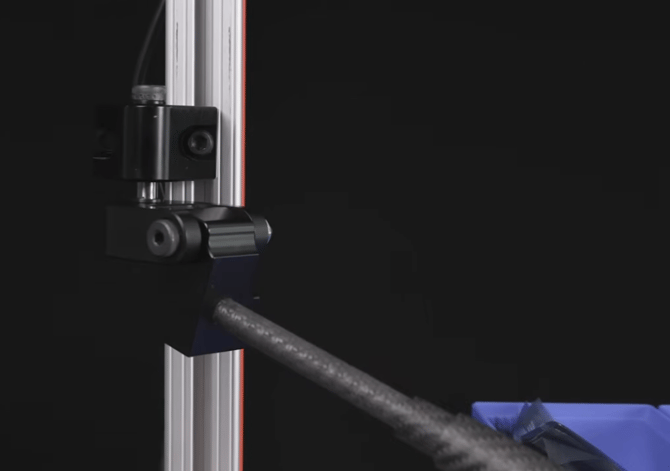
- Manufactured from 7000-series aluminum wrapped in multi-directional carbon fiber for a high strength-to-weight ratio.
- The larger arm diameter near the tool improves rigidity and resistance to torsional forces during fastening.
- Integrated multi-pivot mounting system allows rotational and vertical movement.
- Telescoping carbon arm provides adjustable reach for changing workstation layouts.
Maintenance
- No calibration is required.
- Periodically inspect the arm, pivots, and mounting hardware for wear or damage.
- Clean the telescoping sections regularly to ensure smooth extension and retraction. Verify all fasteners and clamps are secure before use.
Integration / Advanced Notes
- Compatible with electric and pneumatic assembly tools.
- Integrates with compatible tool holders, clamps, and balancers.
- Designed for manual production workstations and assembly cells.
- Mechanical system requiring no power or electronic controls.
Media & Supporting Content
Related Articles / Content
- CTA-Series Telescoping Torque Arm Product Page
- CTA-Series Telescoping Torque Arm FAQ
- Torque Arm Product Catalog (ATS, CTA, LTS Overview)
- Webinar: How to Select an Ergonomic Torque Arm Solution to Reduce Workers’ Comp Liability
- How to Choose a Torque Arm Solution
- Ergonomic Torque Arm: Prevent Side Load & Cross-Threading
- Mountz REBA-Informed Ergonomic Risk Scale for Fastening Applications
Need Help?
- Contact Applications Engineering for setup guidance
- Speak with Sales for product selection
- Call us:
- North America:(408) 850-9978
- International: +44 1428 741756


 M-F 6am - 5pm PST


