



Quick Answer
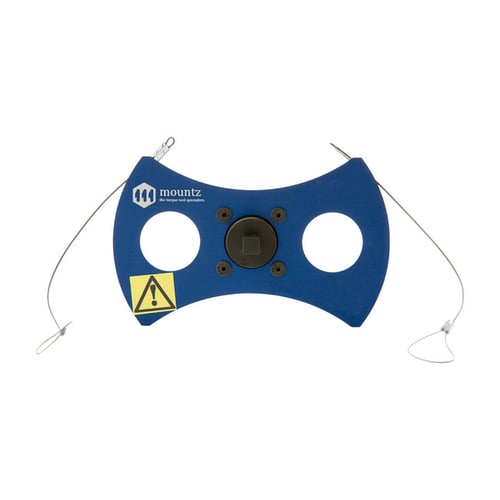
A Mountz Calibration Wheel is used with a hanger and calibrated weights to apply a known torque load to a small torque analyzer or torque sensor. The wheel attaches to the input drive of the analyzer or sensor, while the hanger and weights provide the load required for calibration. Mountz offers three Calibration Wheel models with 1, 2, and 4-inch radii and maximum weight capacities ranging from 50 ounces to 65 pounds.
What Is a Calibration Wheel Used For?
Calibration Wheels are engineered for calibrating small torque analyzers and torque sensors.
Mountz identifies torque calibration equipment as a means of calibrating torque testers and sensors and supporting traceability to National or International Standards such as NIST and ISO.
How Does a Calibration Wheel Work?
A Calibration Wheel uses a known radius and calibrated weight to create a known torque load.
For calibration, the wheel attaches to the input drive of the torque analyzer or sensor. A hanger is suspended from the wheel, and calibrated weights are added to create the required load.
The amount of total weight required depends on the torque range of the analyzer or sensor and the radius of the Calibration Wheel.
Dead Weight Calibration Setup
Mountz identifies three components of a dead weight test set:
- Segment Arm or Calibration Wheel
- Hanger
- Weights
The weights are placed on the hanger, which is suspended from the Calibration Wheel. The total weight includes both the hanger and the weights.
Available Models
| Model | Item # | Max Weight | Tolerance | Input Drive | Radius |
|---|---|---|---|---|---|
| 1.0 | 069980 | 50 oz. | ±0.001 | 1/4" | 1" |
| 2.0 | 060095 | 20 lbs. | ±0.001 | 1/4" & 3/8" | 2" |
| 4.0 | 060064 | 65 lbs. | ±0.002 | 1/4" & 3/8" | 4" |
Selecting a Calibration Wheel
When selecting a Calibration Wheel, consider:
- Torque range of the analyzer or sensor
- Wheel radius
- Maximum weight capacity
- Input drive size
- Required calibration load
The amount of weight required is determined by the torque range of the analyzer or sensor being calibrated and the radius of the Calibration Wheel.
Compatible Calibration Equipment
Calibration Hangers
A hanger is suspended from the Calibration Wheel and supports the weights used to create the calibration load.
Calibration Weights
Mountz offers calibrated weights for use with Calibration Wheels and Segment Arms. The hanger weight must be included when determining the total applied weight.
Torque Analyzers & Sensors
Calibration Wheels are designed for calibrating small torque analyzers and torque sensors. Select a wheel with an input drive compatible with the equipment being calibrated.
Basic Calibration Setup
- Securely mount the torque analyzer or sensor.
- Select the appropriate Calibration Wheel.
- Attach the wheel to the input drive of the analyzer or sensor.
- Attach the appropriate hanger.
- Add the required calibrated weights.
- Apply the known torque load.
- Repeat the process at the required calibration points.
Follow the calibration procedure appropriate for the specific torque analyzer or sensor being calibrated.
Calibration Wheel vs. Segment Arm
Mountz offers both Calibration Wheels and Segment Arms for calibrating torque analyzers and sensors.
Calibration Wheels are specifically identified by Mountz for small torque analyzers and sensors and are available with 1, 2, and 4-inch radii.
Segment Arms are available in longer lengths and with higher maximum weight capacities.
Select the calibration equipment appropriate for the torque range, input drive, and calibration setup.
Media & Supporting Content
Related Content
- Torque Analyzers
- Torque Sensors
- Calibration Segment Arms
- Calibration Equipment
- Webinar: Learn How to Calibrate a Torque Analyzer and Torque Sensor
Need Help?
- Contact Applications Engineering for setup guidance
- Speak with Sales for product selection
- Call us:
- North America:(408) 850-9978
- International: +44 1428 741756


 M-F 6am - 5pm PST


